<?xml version="1.0" encoding="utf-8"?><feed xmlns="http://www.w3.org/2005/Atom" ><generator uri="https://jekyllrb.com/" version="4.4.1">Jekyll</generator><link href="https://www.hackdesign.org/feed.xml" rel="self" type="application/atom+xml" /><link href="https://www.hackdesign.org/" rel="alternate" type="text/html" /><updated>2026-01-24T20:27:11+00:00</updated><id>https://www.hackdesign.org/feed.xml</id><title type="html">Hack Design</title><subtitle>An easy to follow design course for people who do amazing things. Receive a design lesson in your inbox each week, hand crafted by a design pro. Learn at your own pace, and apply it to your real life work – no fake projects here.</subtitle><entry><title type="html">Bringing Depth to Design</title><link href="https://www.hackdesign.org/lessons/bringing-depth-to-design/" rel="alternate" type="text/html" title="Bringing Depth to Design" /><published>2025-04-21T00:00:00+00:00</published><updated>2025-04-21T00:00:00+00:00</updated><id>https://www.hackdesign.org/lessons/bringing-depth-to-design</id><content type="html" xml:base="https://www.hackdesign.org/lessons/bringing-depth-to-design/"><![CDATA[<p>Real‑time 3D and crisp micro‑animations no longer require a VFX team; libraries like Three.js make it easy to import and interact with objects, while designer‑friendly tools such as Rive and Spline let you draw, rig, and ship interactive graphics straight from the browser. These advances mean depth, parallax, and motion cues can now serve everyday product interfaces—not just marketing microsites.</p>

<p>For inspiration, here’s some of the latest examples of what you can do with the latest motion and 3D libraries:</p>

<ul>
  <li><a href="https://brand.dropbox.com/">Dropbox’s playful brand hub</a></li>
  <li><a href="https://blobmixer.14islands.com/">Blobmixer’s interactive sculptures</a></li>
  <li><a href="https://ai-sentinel.webflow.io">Sentinel AI’s evolving DNA strand animations</a></li>
  <li><a href="https://www.igloo.inc/">Igloo Inc.’s particle-driven storytelling</a></li>
  <li><a href="https://animejs.com">Anime.js new home page</a></li>
</ul>

<p>In this lesson, you’ll learn how to start adding basic 3D and excellent animation to your designs. Whether you’re comfortable diving into the code yourself or leveraging AI to generate implementations, these powerful tools are now accessible to designers at all technical levels. The resources below provide step-by-step tutorials for the most effective libraries, allowing you to experiment with depth and motion without specialized expertise.</p>

<ol>
  <li>
    <p><a href="https://threejs.org/docs/#manual/en/introduction/Creating-a-scene">Three.js - Creating a Scene</a></p>

    <p>This introduction to browser-based 3D shows you how to build a spinning cube in under 20 lines. Identify the three core objects (scene, camera, renderer) that form the foundation of every Three.js project. Three.js makes custom WebGL accessible when you need precise control over 3D elements.</p>
  </li>
  <li>
    <p><a href="https://greensock.com/get-started/">GSAP - Getting Started</a></p>

    <p>GSAP is a professional-grade animation library obsessed with performance, consistently delivering silky-smooth 60 FPS animations even on low-powered devices. Explore powerful features like ScrollTrigger that synchronizes complex animations with scroll position, or the timeline functionality that precisely sequences multiple animations. GSAP’s performance-first approach ensures your animations remain buttery smooth while clarifying relationships and guiding user attention throughout your interface.</p>
  </li>
  <li>
    <p><a href="https://rive.app/">Rive - Visual State Machines</a></p>

    <p>Rive is a no-code tool that lets designers connect hover, click, or drag triggers to vector animations without writing JavaScript. Export a Rive animation and compare its file size to an equivalent GIF to see the efficiency benefits. Rive enables you to create production-ready interactions visually.</p>
  </li>
  <li>
    <p><a href="https://spline.design/">Spline - Code &amp; Viewer Export</a></p>

    <p>Spline is a browser-based 3D tool that exports complete interactive scenes as a single component. Try making a simple scene and enabling “Orbit” on scroll to see how easily you can integrate 3D experiences. Spline makes scroll-reactive 3D accessible without requiring any WebGL expertise.</p>
  </li>
  <li>
    <p><a href="https://www.mixamo.com/">Adobe Mixamo - Character Animation</a></p>

    <p>Mixamo is a free service that automates 3D character rigging and animation. Upload a model and instantly apply professional motion-captured animations, making it easy to add lifelike characters to Three.js or Spline projects without specialized skills.</p>
  </li>
</ol>]]></content><author><name>anand-sharma</name></author><category term="3d" /><summary type="html"><![CDATA[Add real-time 3D and motion to product interfaces with Three.js, Rive, and Spline. Explore modern depth and animation techniques.]]></summary></entry><entry><title type="html">Great Animations</title><link href="https://www.hackdesign.org/lessons/great-animations/" rel="alternate" type="text/html" title="Great Animations" /><published>2025-04-14T00:00:00+00:00</published><updated>2025-04-14T00:00:00+00:00</updated><id>https://www.hackdesign.org/lessons/great-animations</id><content type="html" xml:base="https://www.hackdesign.org/lessons/great-animations/"><![CDATA[<p>Why do some animations feel better than others? Do you ever see an animation and think, “Wow, that feels good”? Or maybe you’ve seen one and didn’t really like it? Can you actually describe what makes the difference? Let’s try to do it here.</p>

<h2 id="great-animations-feel-more-natural">Great animations feel more natural</h2>

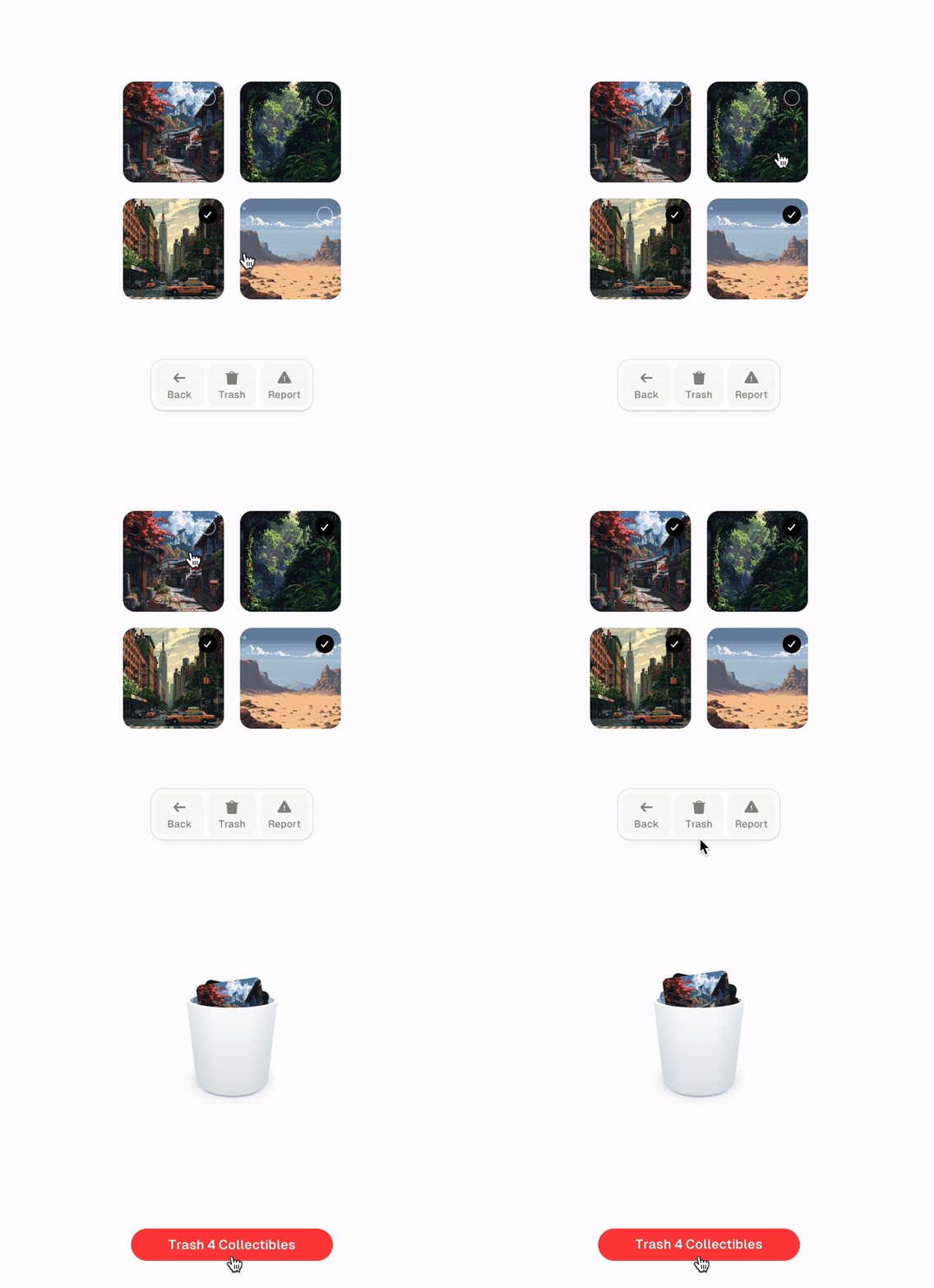
<p>Linear animations are rarely used, they feel robotic and unnatural as almost nothing in the in the world around us moves at a constant speed. Using spring animations, or an easing type that resembles something in the real world can make an animation feel familiar and less artificial.</p>

<p><img src="/assets/images/lessons/great-animations-1.gif" alt="Animated Trashcan Example" /></p>

<h2 id="great-animations-are-fast">Great animations are fast</h2>

<p>User’s want instant feedback on their actions. When they click on a button, a modal should appear in 200ms or less, preferrably with an ease-out curve to make it seem even faster while maintaining decent motion.</p>

<p><img src="/assets/images/lessons/great-animations-2.gif" alt="Animated Loading Example" /></p>

<p>Speed of our animations can also alter the perceived performance of your app. Which loading spinner below will load the app faster? I’d say the one on the right, it moves fast and tells me that it’s working very hard to load the data for me.</p>

<h2 id="great-animations-have-a-purpose">Great animations have a purpose</h2>

<p>It’s easy to start adding animations everywhere. The user then becomes overwhelmed and animations lose their impact. We need to pace them through the experience and add them in places where they enrich the information on the page.</p>

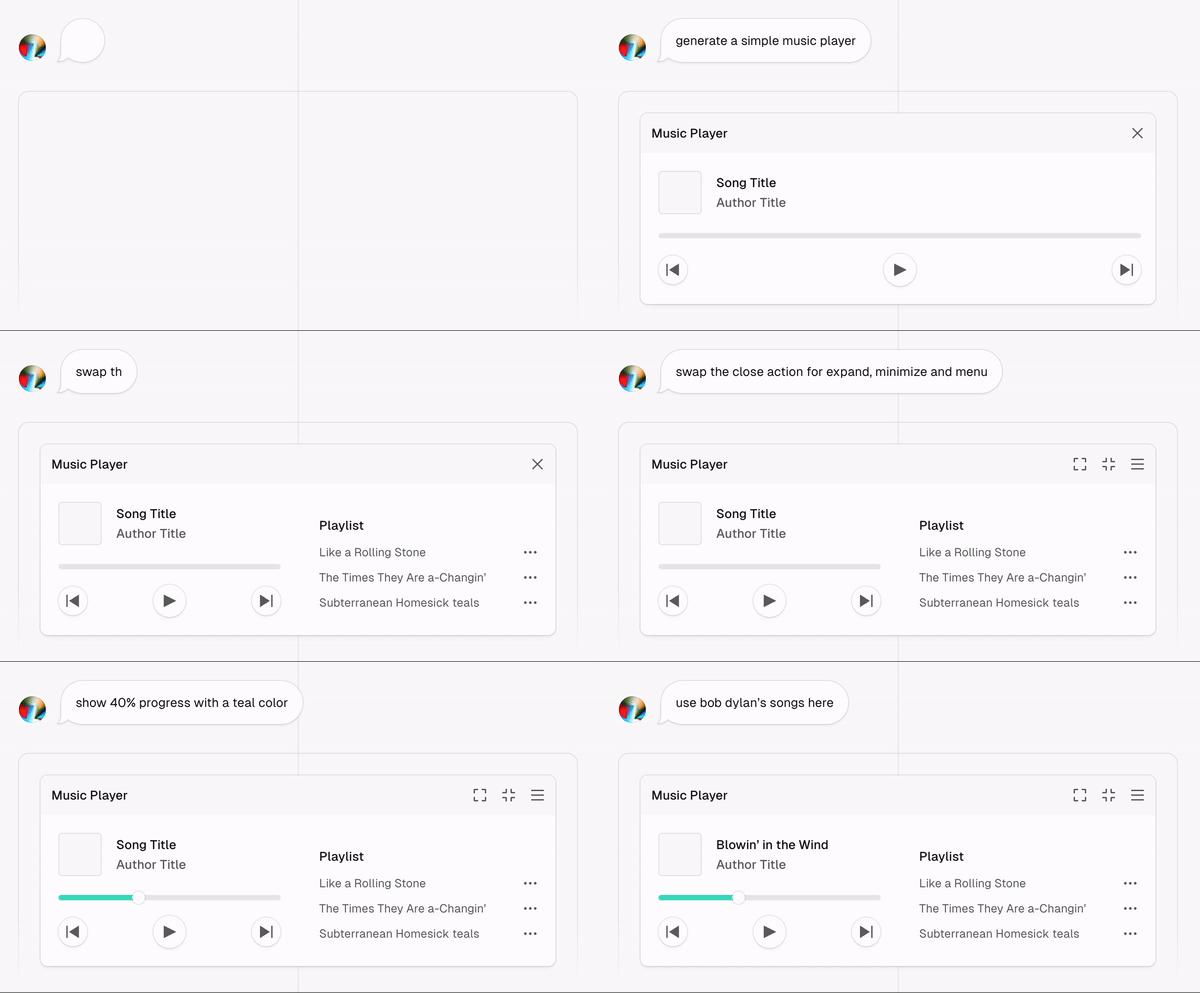
<p>A good example is this animation I made for Vercel. It explains how v0 works. While this animation is arguably entertaining to watch, it’s also insightful.</p>

<p><img src="/assets/images/lessons/great-animations-3.gif" alt="Animated Music Player Example" /></p>

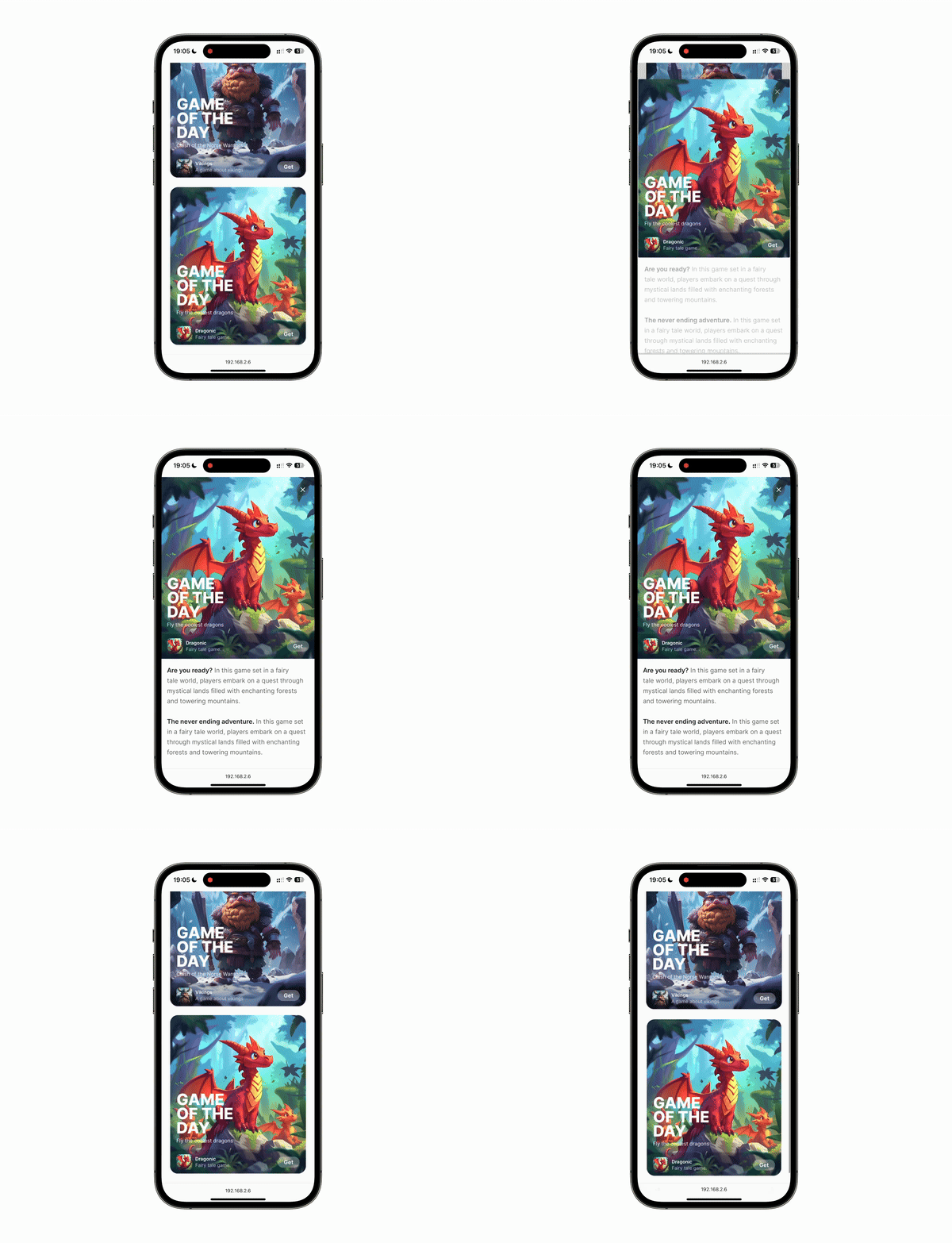
<p>We can also use it to indicate a change in state like in this app store cards example.</p>

<p><img src="/assets/images/lessons/great-animations-4.gif" alt="Animated App Store Example" /></p>

<p>When you think about adding an animation, you should consider how often the user will see it. I use Raycast’s command menu a lot, it would be annoying and tiring to see the same animation hundreds of times a day.</p>

<p><img src="/assets/images/lessons/great-animations-5.gif" alt="Animated Raycast example" /></p>

<h2 id="great-animations-are-hard">Great animations are hard</h2>

<p>This should give you a good starting point for creating great animations. But if you’d want to learn more, here are some additional resources:</p>

<ol>
  <li>
    <p><a href="https://www.youtube.com/watch?v=fZpTvZuysIo">Motion &amp; Platfulness</a></p>

    <p>Great presentation by Benjamin De Cock about motion.</p>
  </li>
  <li>
    <p><a href="https://developer.apple.com/videos/play/wwdc2018/803">Designing Fluid Interfaces</a></p>

    <p>A must watch presentation by Apple.</p>
  </li>
  <li>
    <p><a href="https://benji.org/family-values">Family Values</a></p>

    <p>A post on how the Family app was built. Contains lots of animation details.</p>
  </li>
  <li>
    <p><a href="https://emilkowal.ski/ui/developing-taste">Developing Taste</a></p>

    <p>On what taste is and why it matters.</p>
  </li>
  <li>
    <p><a href="https://animations.dev/">Animations on the Web</a></p>

    <p>My course that teaches you how to build animations on the web.</p>
  </li>
</ol>]]></content><author><name>emil-kowalski</name></author><category term="ux" /><summary type="html"><![CDATA[Learn what makes animations feel natural and responsive. Master spring animations, easing curves, and timing for delightful interfaces.]]></summary></entry><entry><title type="html">Embracing the Ordinary Through Super Normal Design</title><link href="https://www.hackdesign.org/lessons/embracing-the-ordinary-through-supernormal-design/" rel="alternate" type="text/html" title="Embracing the Ordinary Through Super Normal Design" /><published>2025-04-07T00:00:00+00:00</published><updated>2025-04-07T00:00:00+00:00</updated><id>https://www.hackdesign.org/lessons/embracing-the-ordinary-through-supernormal-design</id><content type="html" xml:base="https://www.hackdesign.org/lessons/embracing-the-ordinary-through-supernormal-design/"><![CDATA[<p>What have you used hundreds of times without ever noticing it? The pen on your desk, the chair you’re sitting in, the handle on your kettle. They’re not designed to grab your attention—they’re designed to <em>work</em>. Flawlessly, invisibly. This is the ethos behind <em>super normal</em> design, a term coined by Jasper Morrison and Naoto Fukasawa in a 2006 exhibition of 204 ordinary objects. The pieces weren’t flashy or conceptual. They were things you’d find in your grandmother’s kitchen drawer or a convenience store shelf—chosen not for novelty, but for their enduring, near-perfect functionality. The point wasn’t to admire them, but to <em>recognize</em> them. To realize you already knew them intimately.</p>

<p>Super normal design values the unchanging. It respects the kinds of forms that evolve not from brainstorming sessions or moodboards, but from decades of use. Morrison and Fukasawa didn’t claim to <em>create</em> these objects—they curated them. And their shared thesis was quiet but radical: good design doesn’t scream. It harmonizes with human behavior so naturally it becomes invisible. In an industry obsessed with differentiation, super normal is a call to humility. To restraint. To studying the objects and interfaces that already work astonishingly well—and understanding <em>why</em>.</p>

<ol>
  <li>
    <p><a href="http://digitalwaveriding.com/super-normal-ux-design/">Super Normal UX Design</a></p>

    <p>In this insightful article on “Super Normal UX Design,” Thomas Schinabeck explores how true simplicity in design isn’t about minimalism but about creating experiences that feel familiar yet superior—designs that harmonize with users’ natural workflows and mental models. Using the example of the Mailbox app, he demonstrates how “super normal” digital products maintain comfortable familiarity while subtly enhancing functionality, creating interfaces that feel timeless and intuitive because they’re built on deep understanding of user behavior and context.</p>
  </li>
  <li>
    <p><a href="https://www.youtube.com/watch?v=DEg5u1kyNEs">Why Some Designs Are Impossible to Improve: Quintessence</a></p>

    <p>Certain designs achieve “quintessential” status not just through quality, but through scale, simplified manufacturing processes, legal protections, and their ability to become culturally indispensable. The most enduring designs, from paperclips to smartphones, tap into an emotional resonance beyond mere functionality—an almost magical “fifth element” that transforms ordinary objects into classics we can’t imagine living without.</p>
  </li>
  <li>
    <p><a href="https://www.youtube.com/watch?v=ZXvbKw3XDUA">Jasper Morrison on Designing from Personal Experience</a></p>

    <p>Jasper Morrison walks through decades of his own work to make a simple argument: the best objects are often the least noticeable. He highlights how anonymous, utilitarian designs—those that exist to serve, not to seduce—offer the most lasting value. Rather than chasing novelty, Morrison urges designers to question their motives and find true functional beauty.</p>
  </li>
  <li>
    <p><a href="https://www.youtube.com/watch?v=ZBKfjHQoUIU">The Definition of Good Design by Naoto Fukasawa</a></p>

    <p>In this interview with Naoto, he discusses his design philosophy, emphasizing observation of human behavior and creating products that harmonize with natural interactions rather than drawing attention to themselves. Fukasawa explains that good design is about creating harmony between people and objects—designs that become so intuitive that people unconsciously choose them over other options, which represents the true definition of good design.</p>
  </li>
  <li>
    <p><a href="https://www.goodreads.com/book/show/1180287.Super_Normal">Super Normal: Sensations of the Ordinary</a></p>

    <p>Browse through images from the original Super Normal exhibition curated by Fukasawa and Morrison. Study the everyday objects that exemplify their philosophy—items that don’t announce their design credentials but simply do their jobs exceptionally well.</p>
  </li>
</ol>

<p>In a world obsessed with novelty and disruption, supernormal design asks us to slow down and appreciate what already works. It challenges us to design not for immediate impact, but for enduring usefulness—to create things that might never be consciously noticed but would be deeply missed if they disappeared.</p>]]></content><author><name>alex-baldwin</name></author><category term="ux" /><summary type="html"><![CDATA[Explore super normal design: objects and interfaces so well-designed they become invisible. Learn why restraint beats novelty.]]></summary></entry><entry><title type="html">Moving Beyond “Move Fast and Break Things”</title><link href="https://www.hackdesign.org/lessons/moving-beyond-move-fast-and-break-things/" rel="alternate" type="text/html" title="Moving Beyond “Move Fast and Break Things”" /><published>2025-03-31T00:00:00+00:00</published><updated>2025-03-31T00:00:00+00:00</updated><id>https://www.hackdesign.org/lessons/moving-beyond-move-fast-and-break-things</id><content type="html" xml:base="https://www.hackdesign.org/lessons/moving-beyond-move-fast-and-break-things/"><![CDATA[<p>The early tech era was defined by Facebook’s famous mantra: “Move fast and break things.” Today, with LLMs and AI code editors like Cursor, designers and developers can build faster than ever before. But our industry has evolved—now we’re asked to build trust and design with long-term impact in mind, especially for financial applications and sensitive data.</p>

<p>This lesson explores how designers are shifting from breakneck velocity to sustainable growth while maintaining the spirit of rapid iteration. You’ll learn to design systems, products, and experiences that prioritize resilience without sacrificing user needs.</p>

<ol>
  <li>
    <p><a href="https://www.wired.com/2012/02/zuck-letter/">Mark Zuckerberg’s Original Letter to Investors</a></p>

    <p>Before deconstructing the “move fast” mindset, it’s worth examining the source. In this 2012 IPO letter, Zuckerberg outlines Facebook’s “hacker way” philosophy that shaped Silicon Valley’s approach to product development.</p>

    <p><strong>Identify one value from the letter that still resonates with your design practice and one that feels outdated in today’s landscape.</strong></p>
  </li>
  <li>
    <p><a href="https://x.com/thedanigrant/status/1680947274766237698">Why “Move Fast and Break Things” Is Outdated Advice</a></p>

    <p>Jam.dev CEO Dani Grant explains why this decade-old advice has evolved and how slowing down to fix things can actually be the key to finding product-market fit.</p>

    <p><strong>Identify one area in your current design process where intentionally slowing down could improve quality or user experience.</strong></p>
  </li>
  <li>
    <p><a href="https://hbr.org/2025/03/leaders-can-move-fast-and-fix-things?ab=HP-hero-latest-1">Leaders Can Move Fast and Fix Things</a></p>

    <p>This HBR piece draws from global digital infrastructure examples to demonstrate how speed and responsibility can coexist when systems are designed with public value, adaptability, and long-term trust.</p>

    <p><strong>Sketch a simple change to your current product that would signal greater care, reliability, or clarity to your users.</strong></p>
  </li>
  <li>
    <p><a href="https://pair.withgoogle.com/guidebook/">Google PAIR: The People + AI Guidebook</a></p>

    <p>As AI products evolve rapidly, this practical guidebook from Google’s People + AI Research team offers thoughtful approaches to designing human-centered AI systems, covering data transparency, mental models, and building trust.</p>

    <p><strong>Review one section relevant to your work and note a principle to implement in your next product sprint.</strong></p>
  </li>
  <li>
    <p><a href="https://en.slow-media.net/manifesto">The Slow Media Manifesto</a></p>

    <p>For a philosophical perspective, this manifesto responds to fast, disposable content by advocating for more thoughtful, intentional approaches to digital creation.</p>

    <p><strong>Choose one principle that resonates with you and consider how to incorporate it into your next design feature.</strong></p>
  </li>
</ol>]]></content><author><name>avery-erwin</name></author><category term="career" /><summary type="html"><![CDATA[Shift from breakneck velocity to sustainable growth. Design resilient systems and products without sacrificing user needs.]]></summary></entry><entry><title type="html">Practical AI Tools for Your Everyday Design Tasks</title><link href="https://www.hackdesign.org/lessons/practical-ai-tools-for-your-everyday-design-tasks/" rel="alternate" type="text/html" title="Practical AI Tools for Your Everyday Design Tasks" /><published>2025-03-25T00:00:00+00:00</published><updated>2025-03-25T00:00:00+00:00</updated><id>https://www.hackdesign.org/lessons/practical-ai-tools-for-your-everyday-design-tasks</id><content type="html" xml:base="https://www.hackdesign.org/lessons/practical-ai-tools-for-your-everyday-design-tasks/"><![CDATA[<p>As designers, we’re always looking for ways to streamline our workflows without sacrificing quality. Recent AI tools offer an opportunity to dip our toes into new methods that can turn hours of work into minutes, especially for repetitive tasks. These tools aren’t about replacing your creative process—they’re about adding a few helpful companions to your existing toolkit.</p>

<p>In this lesson, we’ll look at some practical AI tools that can enhance specific parts of your design workflow. No dramatic changes or radical rethinking required—just straightforward ways to save time on tedious tasks and get a little extra help with ideation. We’ll focus on how these tools can complement what you already do well, helping you work a bit faster and explore a few new possibilities along the way.</p>

<ol>
  <li>
    <p><a href="https://www.youtube.com/watch?v=EWvNQjAaOHw">Andrej Karpathy: How I Use LLMs</a></p>

    <p>Andrej explains the best mental model behind how language models work. Understanding this helps you grasp what AI tools can actually do, their limitations, and how to use them effectively.</p>

    <p><strong>Watch the video to understand how these models work, their capabilities, when to use them, and how to best structure prompts.</strong></p>
  </li>
  <li>
    <p><a href="https://bolt.new">Bolt.new: From Figma to Code</a></p>

    <p>This brand new feature converts Figma designs to code. It’s the perfect place to start for a developer handoff.</p>

    <p><strong>Try converting an existing Figma design using Bolt. Where does the tool get it right or wrong?</strong></p>
  </li>
  <li>
    <p><a href="https://v0.dev">V0: Prototyping from Prompts</a></p>

    <p>V0 lets you create production-ready code, through prompts. I’ve found it to be incredibly helpful in making interaction-heavy prototypes that would have taken hours in traditional software.</p>

    <p><strong>Use V0 to mock up an interaction heavy design component like a menu system.</strong></p>
  </li>
  <li>
    <p><a href="https://claude.ai">Claude: Copywriting Assistant</a></p>

    <p>Claude’s Project feature lets you add files to the context window like style guides, examples, and glossaries to keep your writing consistent across your product.</p>

    <p><strong>Create a Claude Project with your brand guidelines and generate copy for a new marketing page.</strong></p>
  </li>
  <li>
    <p><a href="https://perplexity.ai">Perplexity: Real-Time Design Research</a></p>

    <p>Perplexity helps you quickly research competitors, trends, and user behavior with up-to-date information. I’m a bit biased as one of the designers at Perplexity but I still use it as a starting point for almost every project.</p>

    <p><strong>Generate a competitive analysis, summarize app store reviews, or get a trend report related to your project.</strong></p>
  </li>
</ol>]]></content><author><name>alex-baldwin</name></author><category term="ai" /><summary type="html"><![CDATA[Discover AI tools that streamline your design workflow. Save time on repetitive tasks and enhance ideation without big changes.]]></summary></entry><entry><title type="html">Creating a Unique Personal Design Style</title><link href="https://www.hackdesign.org/lessons/creating-a-unique-personal-design-style/" rel="alternate" type="text/html" title="Creating a Unique Personal Design Style" /><published>2018-07-11T00:00:00+00:00</published><updated>2018-07-11T00:00:00+00:00</updated><id>https://www.hackdesign.org/lessons/creating-a-unique-personal-design-style</id><content type="html" xml:base="https://www.hackdesign.org/lessons/creating-a-unique-personal-design-style/"><![CDATA[<p>We’re all scrambling to be different and own our own slice of the design scene. Because of trends and the type of design that we’re exposed to, we all end up consuming the same art and influenced by the same design. Thus, we end up making work that looks similar. There is hope! You harness the power to have a unique style that is a total reflection of who you are as an individual. You are complex and made of a series of interesting qualities that make a big personality unlike anyone else. There is no one in this world that has the exact same qualities, personality, and skills as you! In this lesson you’ll work to define what makes you unique, set a life’s purpose that influences and drives your work, and create a new design style unlike anyone else’s using your unique skillset and personality.</p>

<ol>
  <li>
    <p><a href="https://www.fulltimeyou.co/">Step 1: Define what makes you unique</a></p>

    <p>Before you work on designs, you must first define what makes you a totally unique person. Write a list of three core personality traits, or qualities, that make you amazing and interesting. You’ll translate those into mood boards later, so do your best to choose qualities that can be represented visually. For an in-depth version of this exercise, check out my workbook and video series <a href="https://fulltimeyou.co/">Full Time You</a>! <em>Meg’s example: I love change, I don’t take anything too seriously, I love supporting others.</em></p>
  </li>
  <li>
    <p><a href="https://slashpurpose.org/">Step 2: Create a life’s purpose</a></p>

    <p>A life’s purpose is a crucial thing to have. It should be something short that’s made just for you. Because of your unique personalities, skills, and qualities, your life’s purpose should be easy to fulfill daily by you. Your purpose should drive every career and life’s decision that you make. You should be using your life’s purpose to position your design work and style. <em>Meg’s example: My life’s purpose is to make the world a happier place.</em></p>
  </li>
  <li>
    <p><a href="https://www.creativebloq.com/graphic-design/mood-boards-812470"> Step 3: Visualize your findings</a></p>

    <p>Make a separate mood board for each of your three personality traits or qualities. You’ll likely have to do some critical thinking to maneuver your traits into visuals. Your mood boards should include photography, design, illustration, colors, and whatever else you need to accurately represent your unique qualities. Once your mood boards are finished, take a step back and notice common visual cues that are associated with each. You’ll see that each of the mood boards are vastly different because you’re made of traits that are totally different from one another. Our goal is to combine the mood boards into one super “you” board that will be different from anyone else’s and unlike anything that exists in the world.</p>
  </li>
  <li>
    <p><a href="https://getflywheel.com/layout/how-to-be-inspired-without-copying-someones-work/">Step 4: Create your new design style</a></p>

    <p>Here comes the hard part! Create a new mood board with work entirely made by you. This super “you” board should take elements you notice from each of your individual boards and combine them to create a brand new design style that’s a reflection of the unique person you are. Say one of your boards is full of bright colors and geometric shapes, another has art deco intricate illustrations, and the third has a lot of humor. You’ll create a new style that mixes geometric boldness with intricate line work but has a hilarity to it. Catch my drift? Make sure your new design style is also fulfilling your life’s purpose and utilizing your unique set of skills. If your life’s purpose is to promote bod positivity, you can fulfill that in each piece you make! If you’re skilled at photorealistic portraits, use that! If you’re great at hilarious copy in your work, go for it! Those things are what make you amazing. In the end you’ll create a design style unlike anyone else, because you’re unlike anyone else. Your unique design skillset, life’s purpose, and qualities makes for a style unlike anyone else’s.</p>
  </li>
</ol>]]></content><author><name>meg-lewis</name></author><category term="career" /><summary type="html"><![CDATA[Develop a design style that reflects your unique personality. Define your qualities and translate them into visual work.]]></summary></entry><entry><title type="html">Start Learning 3D</title><link href="https://www.hackdesign.org/lessons/start-learning-3d/" rel="alternate" type="text/html" title="Start Learning 3D" /><published>2018-07-02T00:00:00+00:00</published><updated>2018-07-02T00:00:00+00:00</updated><id>https://www.hackdesign.org/lessons/start-learning-3d</id><content type="html" xml:base="https://www.hackdesign.org/lessons/start-learning-3d/"><![CDATA[<p>Hey, this is Devon! I’m the creator of <a href="https://www.3dfordesigners.com/">3D for Designers</a>. Last week, we talked about designing for the <a href="/lessons/designing-for-augmented-reality/">exciting world of augmented reality</a> (AR). AR enriches your physical environment with an overlay of graphics and data, and is one of several platforms paving the future of design. Other emerging technologies include virtual reality (VR) and 360 video. These experiences are popular for their immersive qualities: users interact with the world in a way that feels natural, but still get the benefits of technology. Emerging platforms are also driven by three-dimensional space, making 3D an urgently-needed foundation for this upcoming era of design. In other words, it’s time to get some 3D in your life! In this lesson, you’ll learn step-by-step how to get started with 3D. It’s easier than you think and will take less than 30 minutes.</p>

<ol>
  <li>
    <p><a href="https://www.3dfordesigners.com/blog/how-to-launch-cinema-4d-lite-in-after-effects">Tutorial: Open Cinema 4D Lite in After Effects (2 min)</a></p>

    <p>Okay, so if Cinema 4D Lite is free with After Effects CC… why does it feel like some huge secret? Well, it’s kind of stuffed between the couch cushions of the app! I’ve met people who have been using After Effects for over TEN YEARS and never knew. This tutorial will show you how to find it and create your very first scene.</p>
  </li>
  <li>
    <p><a href="https://www.3dfordesigners.com/blog/how-to-get-cinema-4d-lite-for-free">How to get Cinema 4D Lite for free</a></p>

    <p>Why don’t more designers know about this?! Cinema 4D is the industry standard for 3D design and motion graphics. You’ve seen it in Black Panther, Stranger Things, and Game of Thrones! And here’s the crazy thing: CINEMA 👏 4D 👏 IS 👏 FREE 👏 WITH 👏 AFTER 👏 EFFECTS. If you have an Adobe Creative Cloud subscription, you already own it.</p>
  </li>
  <li>
    <p><a href="https://www.3dfordesigners.com/blog/3d-art-kickstart-go-with-the-flow">Tutorial: Go with the Flow (15 min)</a></p>

    <p>In this tutorial, we’ll create a wavy plane animation while getting to know the interface. You’ll learn how to transform 3D objects, navigate 3D space, and animate a beautiful wind effect. This tutorial is designed for Cinema 4D first-timers, so dive right in!</p>
  </li>
  <li>
    <p><a href="https://www.3dfordesigners.com/blog/learn-cinema-4d-lite-every-step-of-the-way-tutorial">Tutorial: Every Step of the Way (10 min)</a></p>

    <p>It’s all about color and lighting in this beginner-friendly tutorial! You’ll learn how to instantly repeat 3D objects, control light and shadow, and dial in those colors for the perfect palette.</p>
  </li>
  <li>
    <p><a href="https://c4dfordesigners.com/">Intro to Cinema 4D for Designers</a></p>

    <p>Get ready for the design challenges of the future! In this comprehensive 3D fundamentals course, you’ll learn how to create beautiful shape, form, lighting, color, and animation in 3D.</p>
  </li>
</ol>]]></content><author><name>devon-ko</name></author><category term="3d" /><summary type="html"><![CDATA[Get started with 3D design using Cinema 4D Lite in After Effects. A step-by-step guide for designers entering the world of 3D.]]></summary></entry><entry><title type="html">Designing for Augmented Reality</title><link href="https://www.hackdesign.org/lessons/designing-for-augmented-reality/" rel="alternate" type="text/html" title="Designing for Augmented Reality" /><published>2018-06-25T00:00:00+00:00</published><updated>2018-06-25T00:00:00+00:00</updated><id>https://www.hackdesign.org/lessons/designing-for-augmented-reality</id><content type="html" xml:base="https://www.hackdesign.org/lessons/designing-for-augmented-reality/"><![CDATA[<p>The definition of augment is to “make (something) greater by adding to it.” Augmented Reality (AR) is technology that sets out to do just that by adding a layer of data over the physical world. AR can be experienced in several ways, ranging from smartphones to wearable headsets like the HoloLens. AR has a ton of potential when designing meaningful experiences since it allows a user to become fully immersed inside a moment. The user, who traditionally followed along to a narrative or a story, now becomes the lead and controls what they see. Designers now have an entirely new paradigm to design for and need to consider things such as 3D, space and location. This lesson will get you up to date with the language and foundations of AR. It will shine a light on the current landscape and also help you scope designs for your own projects.</p>

<ol>
  <li>
    <p><a href="https://medium.com/@goatsandbacon/a-quick-guide-to-designing-for-augmented-reality-on-mobile-part-1-c8ecaaf303d5">Talking about Augmented Reality</a></p>

    <p>This article will teach you about the different types of content you will encounter as well as how to properly define an interaction in AR. The language we use to describe something is extremely important since it is so closely tied to our understanding. If we are unable to clearly articulate our intentions, there is a good chance we might not be clear on what we are hoping to achieve. By being able to properly articulate the intentions of the design, it becomes easier to implement in development, as well as get alignment from stakeholders.</p>
  </li>
  <li>
    <p><a href="https://medium.com/@goatsandbacon/a-quick-guide-to-designing-for-augmented-reality-on-mobile-part-2-fb76fe87dd41">Basic Interfaces and Design Patterns</a></p>

    <p>This article is a collection of basic interface patterns and behaviors that have started to emerge in the market. Some of these patterns include alerts, indicators, as well as guides. This article explores the different interactions that are possible with content in AR and also what to be conscious of in this evolving medium.</p>
  </li>
  <li>
    <p><a href="https://medium.com/@goatsandbacon/a-quick-guide-to-designing-for-augmented-reality-on-mobile-part-3-2380f253467a">Color and Text in AR </a></p>

    <p>AR is essentially layering data over a live camera feed. This means that the designer has no control over what the camera shows. There is no guarantee if the background will be light or dark and so it is important to make sure the designs work in as many scenarios as possible. This article covers existing patterns and suggestions for how to effectively design on an ever-changing background.</p>
  </li>
  <li>
    <p><a href="https://uxdesign.cc/designers-guide-to-hardware-and-software-for-mobile-ar-5c800503676d">Hardware and Software for Mobile AR </a></p>

    <p>Hardware and software specs are easy to overlook when focusing on the design and experience. However, when working in new and emerging tech, general comprehension of how things work can help inspire and even bring innovation to this space.</p>
  </li>
</ol>]]></content><author><name>bushra-mahmood</name></author><category term="emergent" /><category term="3d" /><summary type="html"><![CDATA[Learn the foundations of designing for augmented reality. Understand AR types, interactions, and how to scope your projects.]]></summary></entry><entry><title type="html">Design System Fundamentals</title><link href="https://www.hackdesign.org/lessons/design-system-fundamentals/" rel="alternate" type="text/html" title="Design System Fundamentals" /><published>2018-06-11T00:00:00+00:00</published><updated>2018-06-11T00:00:00+00:00</updated><id>https://www.hackdesign.org/lessons/design-system-fundamentals</id><content type="html" xml:base="https://www.hackdesign.org/lessons/design-system-fundamentals/"><![CDATA[<p>Design systems create a bridge between designers and developers. They describe the rules, constraints, and principles of your company’s design language. Design systems aren’t exactly new. If you’ve ever visited New York City, there’s a good chance you’ve benefited from the subway design system to navigate around—officially named the New York Transit Authority graphic standards manual, designed by the infamous Massimo Vignelli. Design systems don’t just provide brand guidelines, they provide a way to consistently implement functional design. In today’s incarnation of design systems, it’s expected that they provide one source of truth for code, along with documentation and design resources. For teams building digital products, design systems can improve workflow efficiency and enable teams to deliver a better experience to customers. With so many examples of design systems out there, it can be hard to know where to start or know what is right for your company. If you work on digital products, even if you don’t work on design systems, taking a systems thinking approach to design and UI development can help you build a good foundation for team collaboration and scaling your product.</p>

<ol>
  <li>
    <p><a href="https://danmall.me/articles/design-systems-pilots-scorecards/">Picking pilot projects</a></p>

    <p>Once you’ve started building and designing your system, it’s important to test all the parts before shipping your first release. Pilots are a good way to test if you’ve met the goals of your design system, such as making it easier for developers to implement designs, and providing a unified design language. Using a set of criteria to determine a project’s potential will help you find great pilot candidates.</p>
  </li>
  <li>
    <p><a href="https://jxnblk.com/writing/posts/components/">Everything is a component</a></p>

    <p>Thinking in components helps you to see every part of the UI as an interoperable system. Design systems should be highly composable, providing many small reusable components that can be mixed and matched and used together to create new components.</p>
  </li>
  <li>
    <p><a href="https://www.designbetter.co/design-systems-handbook/designing-design-system">Designing your design system</a></p>

    <p>It can be daunting to know where to begin with designing your design system, and who you should collaborate with to design it. Typography, spacing, and color each have their own rules and constraints, and every piece should be designed to work in harmony with other parts of the system. Breaking the work down into small manageable chunks will help you find the right model and add the right pieces and be on your way to creating a successful design system.</p>
  </li>
  <li>
    <p><a href="https://www.youtube.com/watch?v=Hx02SaL_IH0&amp;feature=youtu.be">When and how much?</a></p>

    <p>It takes time and resources to build and maintain design systems. When your team is small, investing in design systems might seem like a luxury you can’t afford. Many companies don’t dedicate full time resources until they start feeling the pains of not having one. When you do start working on design systems, it can be difficult to figure out what to prioritize and how to time to spend on them.</p>
  </li>
  <li>
    <p><a href="https://publication.design.systems/distilling-how-we-think-about-design-systems-b26432eefef9">What are design systems, really?</a></p>

    <p>You may have heard of terms such as style guides, pattern libraries, design languages, and components. There are tons of terms and definitions being thrown around which makes it difficult for everyone to come to the same understanding about what design systems are, and what problems they solve. Understanding what they are, or should be in the context of your company is important to establish early on.</p>
  </li>
</ol>]]></content><author><name>diana-mounter</name></author><category term="systems" /><summary type="html"><![CDATA[Build design systems that bridge designers and developers. Learn to create scalable UI components and documentation for team collaboration.]]></summary></entry><entry><title type="html">Getting started with design research</title><link href="https://www.hackdesign.org/lessons/getting-started-with-design-research/" rel="alternate" type="text/html" title="Getting started with design research" /><published>2018-06-04T00:00:00+00:00</published><updated>2018-06-04T00:00:00+00:00</updated><id>https://www.hackdesign.org/lessons/getting-started-with-design-research</id><content type="html" xml:base="https://www.hackdesign.org/lessons/getting-started-with-design-research/"><![CDATA[<p>Design research is the systemic investigation of users and their needs. It employs various methodologies that will help you make more informed decisions when building your products. If you’ve heard about it before, chances are you know that it’s a good thing, but haven’t quite gotten around to doing it. Maybe you don’t feel like you have enough time to invest in it. Maybe you don’t know where to start, or you’re worried about doing it wrong. Here’s the good news: getting started with research is much easier than you think. Here’s more good news: it’s going to save you and your company time, money, and a lot of frustration. It’ll result in a better understanding of your users, and provide you with new opportunities you hadn’t considered. The bad news? There’s no bad news.</p>

<ol>
  <li>
    <p><a href="https://medium.com/@mgallivan/the-case-for-talking-to-users-in-the-age-of-big-data-bca4159e9620">The Case for Talking to Users in the Age of Big Data</a></p>

    <p>I really like the way the author breaks down the unique benefits of qualitative research. It’s a good primer for why this kind of research is worthwhile and why you should invest in reading the rest of these links.</p>
  </li>
  <li>
    <p><a href="https://www.nngroup.com/articles/ux-research-cheat-sheet/">UX Research Cheat Sheet</a></p>

    <p>This short article from the Nielsen Norman Group provides a high level view of many valuable research methods, as well as some best practices. I suggest you start with usability testing, user interviews, and field studies.</p>
  </li>
  <li>
    <p><a href="https://www.nngroup.com/articles/talking-to-users/">Techniques for Talking to Users</a></p>

    <p>A few handy tips for interviewing users without skewing their answers.</p>
  </li>
  <li>
    <p><a href="https://www.sensible.com/rsme.html">Book: Rocket Surgery Made Easy</a></p>

    <p>This book outlines everything you need to know to get started with usability testing. It’ll take you less than a day to read and you’ll be able to apply what you learn right away. Once you get started testing your product, you’ll be surprised by how straightforward it is.</p>
  </li>
  <li>
    <p><a href="https://medium.com/userinterviews/how-to-lead-an-impactful-research-team-3c68946227a7">How to Lead an Impactful Research Team</a></p>

    <p>It’s one thing to conduct a few ad-hoc interviews with users. It’s quite another to build research into your product development process. I’d like to end with this brilliant article explaining how to do just that. It was written with a dedicated research team in mind, but I think it applies to anyone trying to get their companies to buy into the importance of regular research.</p>
  </li>
</ol>]]></content><author><name>joel-califa</name></author><category term="research" /><summary type="html"><![CDATA[Get started with design research to make better product decisions. Learn qualitative methods that save time and money.]]></summary></entry></feed>